Page 1 of 3
Program Control Commands and line input script Challange.
Posted: 10 May 2026 20:47
by Erris
Hi,
Question, in Program Control Commands i try to put:
MAIN_LINEIN_FEED_ON <mixername>[|<fadetime>|<stopplaylist>|<fadeotherio>] in to On program starting or started:
And this one
MAIN_LINEIN_FEED_OFF <mixername>[|<fadetime>|<stopplaylist>|<fadeotherio>] in to On program Stopped
Now the fun part is, the stoped works like a charm, but the starting or started not, it wil not open a input.
In the script if i usi line in it works with start but it goes to early off let say 30 seconds befor news, is that happends the show will be interrupted to early it needs to stop at say --:59:59 (1 sec of fade)
Any idea?
Re: Program Control Commands and line input script Challange.
Posted: 10 May 2026 21:52
by radio42
I have to check, when I am back from holiday in one week.
It might be an issue, that it fires little too early? Or the command is broken?
Can you try adding the following commands before the On Program Started, ie..:
ASYNC
SLEEP 1000
MAIN_LINEIN_FEED_ON …
You might also try adding a Reminder to the Program Scheduler and fire the command on this one?
Re: Program Control Commands and line input script Challange.
Posted: 10 May 2026 22:58
by Erris
I'm going to try your suggestion, have a nice vacation

Re: Program Control Commands and line input script Challange.
Posted: 13 Jun 2026 16:31
by Erris
I did try your idea, still the same problem, i changed the script with instead command i used linein but then it still does not work.
I will try to wait a few weeks, because te problem seems to popup in the houres of saterday from 13:00 to 16:00 17:00 what should be Non-Stop there the linein will be nicely shutdown.
We will have a live programm that also goes trough linein, so let's see if there is a problem.
Could it be that the overlay scheduler has somewere a ghost script that runs on those times?
Re: Program Control Commands and line input script Challange.
Posted: 13 Jun 2026 17:34
by radio42
No. There is no ‚ghost‘ script.
But the overlay player (if defined „Suspend Program“) will of course lower all input mixers while the overlay is playing.
Re: Program Control Commands and line input script Challange.
Posted: 13 Jun 2026 18:51
by Erris
That is correct it should be muting the input mixer, could it be that the suspend_program starts a bit early if so can i change that in settings?
Bellow some screenshots of the scheduler, Program Editor and Script.
To me it looks good.
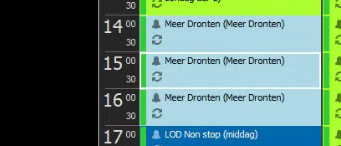
- Scheduler.png (54.7 KiB) Viewed 5359 times
Re: Program Control Commands and line input script Challange.
Posted: 13 Jun 2026 21:55
by radio42
No, it is a fixed internal handling. You can not adjust these settings, when exactly.
But what do you mean exactly by too early.
Just a few milliseconds, or what is your exact requirements?
Re: Program Control Commands and line input script Challange.
Posted: 13 Jun 2026 22:09
by Erris
Hi Bernd,
If it where a few miliseconds i would not ask

no before the news start the linein (LUCI) will be put on mute at say **:59:40 so that is 20 seconds, that is a few ms to much

Re: Program Control Commands and line input script Challange.
Posted: 13 Jun 2026 23:28
by Erris
It is like this:
Propp is running music, thew program Meer Dronten comes up this is a linein (LUCI) Whan this happen all goes great the channel unmute en starts.
But when propp is starting overlay for News and Advertisement the mixer is muting the change 20 second in front of the whole hour. While it should be muting at say 1 sec or less in front of the overlay to start News.
I hopethis shed some light on it.
Re: Program Control Commands and line input script Challange.
Posted: 15 Jun 2026 21:02
by radio42
That is a bit strange, as I just tested it and checked it in the code, but the "Fade-Out of all Inputs" happens exactly when the Overlay starts to play.
Hence my question about a few milliseconds.
So I can not reproduce your issue here. Can you send me your setup of the Overlay Entry in the Overlay scheduler...