Page 1 of 1
Coverart view in ProppFrexx
Posted: 17 Mar 2016 11:11
by XTended
On the right side of player B my "coverart" is visible all the time. How can I remove that?
Re: Coverart view in ProppFrexx
Posted: 17 Mar 2016 14:28
by XTended
Done! There are so many 'hidden' functions

Thanks for your fast reply Bernd.
Re: Coverart view in ProppFrexx
Posted: 17 Mar 2016 21:44
by radio42
Make a right-click on the small arrow icon underneath the DJ Players to the left (like shown in the screen-shot) and deselect the "Show AlbumArt in Player Panel".
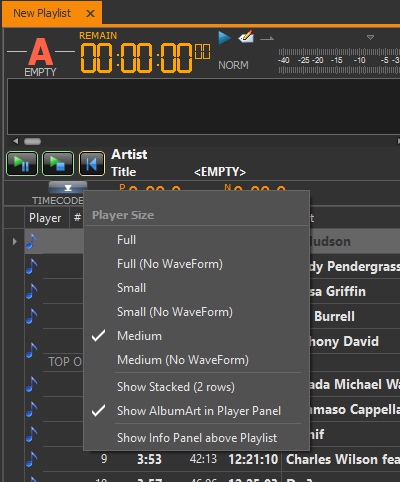
- DisableCoverArt.jpg (70.02 KiB) Viewed 3421 times